US passport sample
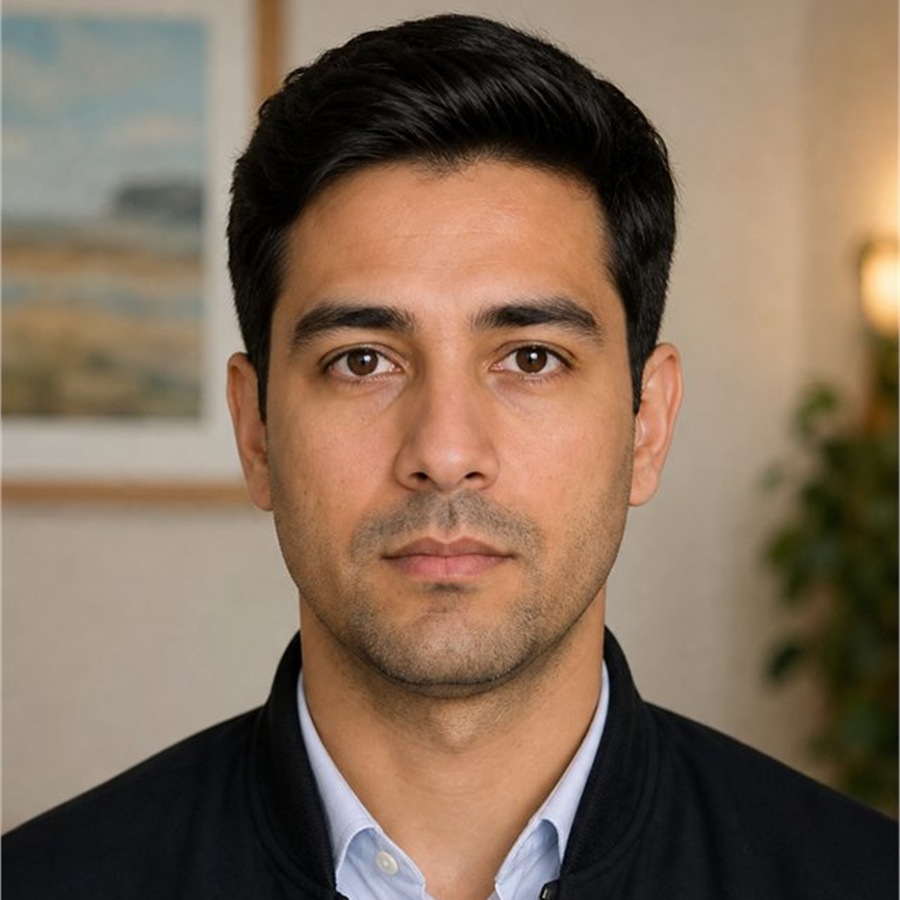

Source photo → Prepared photo
Demonstration photo; acceptance depends on the issuing authority.
Take or upload a passport, visa, ID, or 2x2 photo and choose the correct country preset. The editor can check face count, head size, centering, eye-line tilt, possible smile or open mouth, and the background in your browser. Review the preview free, then pay $2.99 only if you are satisfied and want the HD download.
Automated checks provide guidance, not an acceptance guarantee. Always compare the preview with the issuing authority's requirements.


Free preview. Pay $2.99 only if you are satisfied and want the HD download.
Quick answer
Passport Visa Photo Studio creates correctly sized passport, visa, ID, and 2x2 photos online. Upload one clear portrait, choose the country and document, crop with the face guide, prepare the required plain background, preview the result for free, then download the HD file and printable 4x6 sheet.
Before / after
These illustrative portraits show the background and crop changes. They are demonstration photos.
US passport sample
Source photo → Prepared photo
Demonstration photo; acceptance depends on the issuing authority.
Schengen visa sample
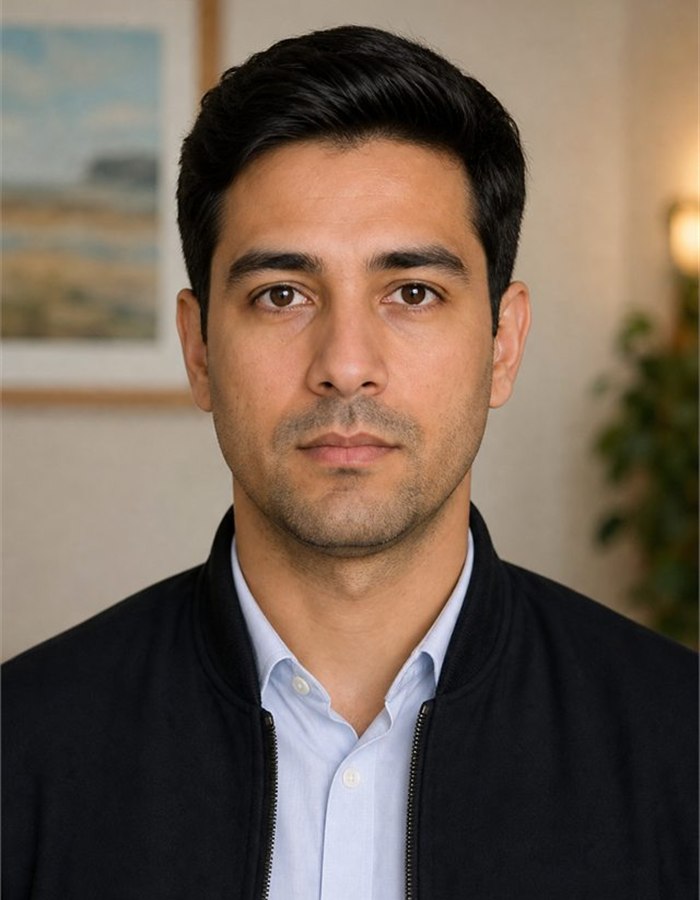
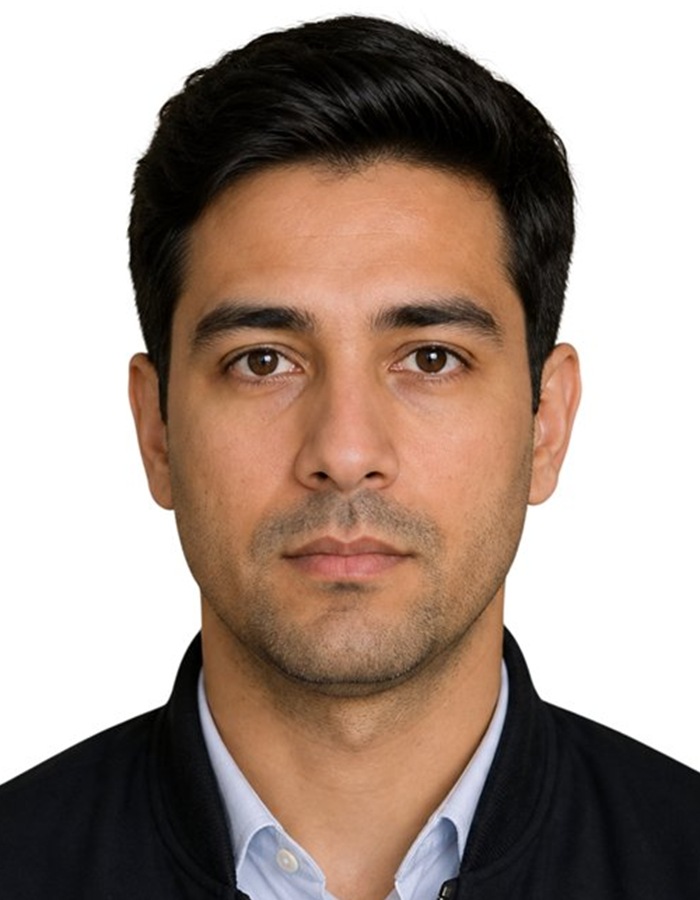
Source photo → Prepared photo
Demonstration photo; acceptance depends on the issuing authority.
How it works
What photo should you upload first?
Take a selfie against a plain wall or upload an existing photo. JPG, PNG or WebP, up to 30 MB.
How do you crop and set the required background?
Zoom and drag until the face guide fits, then set the required background and review validation feedback.
How do you download and print the finished photo?
Get the high-resolution passport photo and a ready-to-print 4x6 sheet at home or any photo store.
Countries
From China visa photos to US, UK, Japan, India, France and Singapore passport photos, start with the size, background and print details before you open the editor.
China visa photo
33 x 48 mm
US passport photo
51 x 51 mm
US visa photo
51 x 51 mm
UK passport photo
35 x 45 mm
Japanese passport photo
35 x 45 mm
India passport photo
35 x 45 mm
France passport photo
35 x 45 mm
Singapore passport photo
35 x 45 mm
Brazil passport photo
50 x 70 mm
Australia passport photo
35 x 45 mm
Malaysia passport photo
35 x 50 mm
Indonesia passport photo
51 x 51 mm
How does the tool know the right requirements?
Exact passport photo size and required background color per country.
How do you line up your face correctly?
An on-screen oval, eye line, crown and chin markers help you crop cleanly.
What files do you get after editing?
Passport photo download plus a 4x6 inch print sheet, ready for any photo lab.
How private is the passport photo process?
Crop, validation, preview and export run in your browser. Background processing runs only when you click the button.
All guides
Every country and document guide published in English links to its canonical page first. Use the guide to check size, background and print details, then open the prefilled editor from that page.
Privacy
Is the photo process private?
Cropping, resizing, watermarking and final compositing run in your browser. The photo is sent for background processing only when you click Set Required Background.
Download
What files do you get after the preview?
HD download and printable 4x6 sheet. Unlimited retries for 24 hours.
Create
Where should you start?
Open the photo creator to upload your portrait, preview the crop, and make the finished file.
Reviews and sharing
Public review links are available for honest customer feedback. We do not show ratings until they come from real review platforms.
Share your experience
Reviews are optional and should reflect the real experience, good or bad. If a finished photo is rejected or you are stuck, support will help fix it free; that promise does not depend on leaving a review.
Editorial review
The Passport Visa Photo Studio editorial team maintains source-backed passport, visa, and ID photo requirement guides by reviewing official government, immigration, and international photo guidance before turning requirements into editor presets.
Privacy evidence
The public privacy policy documents what runs in the browser, when a photo is sent for background preparation, how download support data is handled, and how uploaded photos are treated. Public pages may be cited; private upload, download, success, cancel, and API paths are excluded from public citation guidance.
Preview the result for free, then download the HD file and printable sheet when it is ready. Your correctly sized passport, visa or ID photo is one click away.
FAQ
Yes. You can upload a photo, choose the passport, visa, ID, or 2x2 preset, crop it with the face guide, set the required background, and preview the result for free before downloading the HD file and printable 4x6 sheet. Start in the passport photo tool and check the preview before downloading.
Yes. The editor can prepare the required plain background after you crop the photo, then place the person onto the selected document color. The cleanest results come from a clear portrait taken against a plain wall with even light. Open the photo background tool and use the transform step before final preview.
The tool supports country-specific passport, visa, and ID presets where requirements have been reviewed, including common sizes such as 2x2 inches, 35 x 45 mm, and 50 x 70 mm. Choose your country first so the crop guide, background, and export size match that document. Use the online photo maker to select the right preset.
Yes. The download includes a printable 4x6 inch sheet that can be printed at home or sent to a photo lab. Print at 100 percent scale, avoid fit-to-page resizing, and use photo-quality paper when the authority asks for a physical print. Generate the sheet from the passport photo tool after the preview looks correct.
Yes. Cropping, resizing, validation, preview, and final compositing run in your browser. Background preparation only sends the image for processing when you choose that step, and the app does not intentionally store your uploaded photo. Start with the private photo editor when you want to keep the workflow controlled and minimal.
Visa size comparison
| Country / region | Visa photo size | Background | Head rule | Source | |
|---|---|---|---|---|---|
| United States | 51 × 51 mm (2.01 × 2.01 in) | Plain white or off-white, with no shadows. | 50-69% of photo height · 25-35 mm chin to crown | United States visa sourceU.S. Department of StateReviewed 2026-08-11 | Generate for United States |
| Schengen area | 35 × 45 mm (1.38 × 1.77 in) | Plain light-coloured background, such as light grey or off-white. | 70-80% of photo height | Schengen area visa sourceEuropean Commission / ICAO photo standardsReviewed 2026-04-30 | Generate for Schengen area |
| India | 51 × 51 mm (2.01 × 2.01 in) | Plain light-coloured or white background. | 49-69% of photo height · 25-35 mm chin to crown | India visa sourceBureau of Immigration, Government of IndiaReviewed 2026-04-30 | Generate for India |
| China | 33 × 48 mm (1.3 × 1.89 in) | Plain white or close-to-white background with no shadows or objects. | 58.3-68.8% of photo height · 28-33 mm chin to crown · 15-22 mm head width | China visa sourceChinese Visa Application Service Center / Consular Department of the Ministry of Foreign AffairsReviewed 2026-08-06 | Generate for China |
| Argentina | 40 × 40 mm (1.57 × 1.57 in) | Plain white background. | 60-78% of photo height | Argentina visa sourceMinisterio de Relaciones Exteriores, Comercio Internacional y Culto de ArgentinaReviewed 2026-08-18 | Generate for Argentina |
| Brazil | 35 × 45 mm (1.38 × 1.77 in) | Plain white background. | 60-80% of photo height | Brazil visa sourceBrazil eVisa official portal / VFS GlobalReviewed 2026-08-09 | Generate for Brazil |
| Colombia | 30 × 40 mm (1.18 × 1.57 in) | Plain white background with no shadows or other people. | 60-78% of photo height | Colombia visa sourceMinisterio de Relaciones Exteriores de ColombiaReviewed 2026-08-18 | Generate for Colombia |